TF6420 - TwinCAT 3 Database Server | Introduction
Remember that this page isn’t affiliated with BECKHOFF and MUST NOT be used as official documentation. For that, please refer to the official BECKHOFF webpage.
All content is free, and the main goal is to provide TUTORIALS. If you plan to use ANY of it in production or real applications, it MUST be thoroughly tested before implementation (use the code at your own risk).
For TF6420 TwinCAT 3 Database Server, BECKHOFF Infosys contains comprehensive documentation. I highly encourage you to read it thoroughly!
Introduction
The TF6420 library is designed to enable seamless integration between automation (AT) and information (IT) technologies. While the Industrial PC performs real-time control tasks, it can establish a connection with several database types — either local or remote. Despite the simplicity of this integration, it allows for the creation of complex architectures.
BECKHOFF has categorized the TF6420 setup into four different approaches, each tailored to distinct programming profiles. These setups can be freely combined, forming a powerful tool when each is used according to its strengths:
- Configure Mode: pure configuration solution
- Database connections for simple applications based entirely on graphical configuration, with no code required.
- PLC Expert Mode: programming solution for traditional PLC programmers
- Database connections for both simple and complex applications using PLC function blocks. Most database commands are generated automatically by the Database Server.
- SQL Expert Mode: programming solution for PLC and SQL/database experts
- Database connections using PLC function blocks and C++ interfaces. Commands are assembled automatically during runtime, providing maximum flexibility.
- NoSQL Expert Mode: programming solution for PLC programmers and NoSQL database specialists
- Enables the creation and execution of NoSQL commands directly within the program sequence, suitable for a wide range of applications.
Note: TwinCAT Database Server is not installed by default with TwinCAT XAE/XAR. You must install it separately using the TwinCAT Package Manager for systems with build 4026 or higher, or the MSI (.exe installer) for builds 4024 or lower.
On non-Windows CE devices, the configuration file is located at
C:\TwinCAT\3.1\Boot.
On Windows CE devices, it is located at\Hard Disk\TwinCAT\3.1\Boot.
Read and write access is available for different database systems. Optional database extensions can be enabled or disabled as needed.
Important Considerations
Compatibility between TF6420 versions
Note that the TwinCAT Database Server is a product under continuous development, and the library is updated in response to technological demands and advancements. These updates are organized into milestones. As a user, it is noticeable that BECKHOFF consistently aims to avoid changes that require new deployments, as they may lead to compatibility issues with legacy applications. However, such changes are sometimes unavoidable and must be taken into account when developing a new application or updating an existing one.
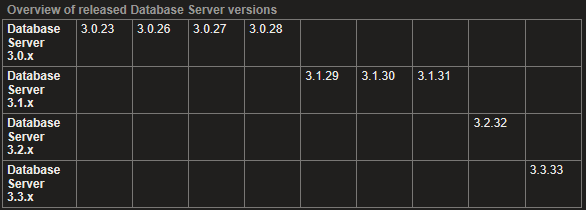 Library compatibility between TF6420 versions
As BECKHOFF officially mentions in their Infosys:
Notes on the transition from 3.0.x to 3.1.x
In addition to new and higher-performance functions, a key aspect was compatibility between versions 3.0.x and 3.1.x. For example, old PLC code, in which the Tc2_Database.compiled library is used, can also be used with the new 3.1.x version ADS server. The old Tc2_Database.compiled library continues to be installed in version 3.1.x during setup. The XML files created by the configurator for the server differ between versions 3.0.x and 3.1.x. It is possible to read old configuration files with the new configurator (standalone) and even to convert them to the new format, if required.
Backup of the old XML configuration
During an update from the TwinCAT Database Server 3.0.x to the new 3.1.x version, the old XML configuration is saved. It is renamed to “CurrentConfigDataBase_OLD.xml” and remains in the TwinCAT boot directory.
Supported Databases
On this post date, the supported databases for TF6420 library are listed below: 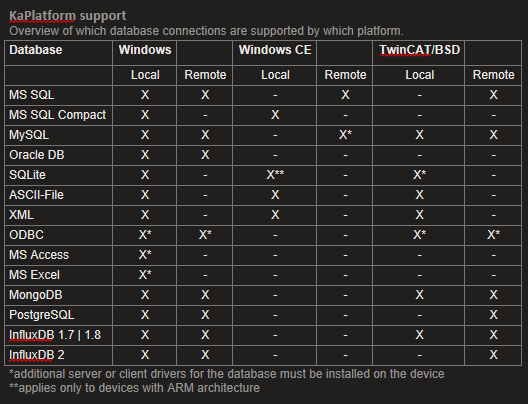 Supported databases of TwinCAT Database Server
This isn’t always updated with official BECKHOFF documentation, please refer to the official and updated list of supported databases here.
Considerations about data types
PLC data types vs SQL data types
When using the TF6420 library, it is important to pay close attention to data types, as they are not directly name-matched between the PLC and the database. In the following example, we use PostgreSQL, and the mapping can be seen below:
This relationship is not always consistent across different databases. You can find the full mapping list here and verify compatibility with your specific database system.
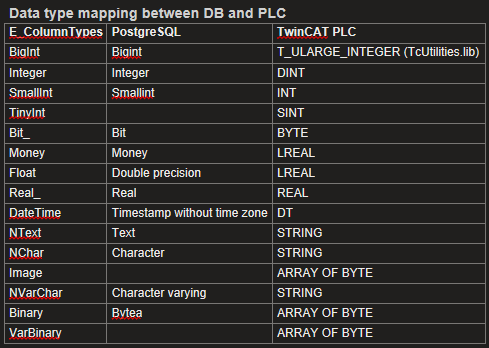 PLC vs PostgreSQL data types relationship
Memory representation on PLC
Another important reference is the memory representation of each variable on the Industrial PC, based on its data type. This information is crucial to understand how each database type maps to a corresponding PLC data type, depending on how many bits are used for storage.
You can find this information here.
Download of TF6420 example
You can download my TF6420 full example on my Github.